SOC 2 compliance automation with evidence you can verify
Your enterprise customer wants a SOC 2 report. Meiyam tracks the 38 criteria of the Security, Availability and Confidentiality categories, checks the ones configuration can prove with automated rules, and shows for every criterion whether a rule, a document or nothing yet evidences it. Evidence is sealed as it is collected, so you can show your auditor it has not changed since.
SOC 2 criteria
8 of 38
checked by automated rules
- Automated rules 8
- Documents 30
SOC 2 at a glance
The figures behind Meiyam's SOC 2 coverage, read from the product's rules and criteria catalogue.
- Automated rules, run on every scan you start or a GitHub change triggers.
- 77
- Each maps to SOC 2 and ISO 27001
- Live integrations, every one read-only.
- 7
- Each lists its access before you connect
- Criteria shown as passing without evidence.
- 0
- Every criterion starts unproven
- Policy templates that between them address every criterion Meiyam tracks.
- 23
- Each mapped to both frameworks
SOC 2 in brief
A SOC 2 report is an independent CPA firm's examination of your controls against the AICPA Trust Services Criteria; Meiyam prepares the evidence and issues no opinion.
SOC 2 is an examination of the controls at a service organisation, reported against the Trust Services Criteria published by the AICPA. Enterprise buyers ask for the report because it gives them an independent view of how a supplier protects the systems and data they depend on.
Every SOC 2 report includes Security, the Common Criteria. Availability, Confidentiality, Processing Integrity and Privacy are added when they matter to your customers. Meiyam tracks Security, Availability and Confidentiality: 38 criteria in all.
An independent CPA firm performs the examination and issues the report. Meiyam does not issue audit opinions, attestations or reports, and it does not replace the examination. It keeps the evidence your auditor will ask for current, organised and verifiable, and shows which criteria still need your input.
| Type 1 | Type 2 | |
|---|---|---|
| What it reports on | Whether controls are suitably designed and implemented, as of one date | Design, and whether the controls operated effectively |
| Timeframe | A single date | A period you agree with your auditor |
| Evidence | That each control exists as described | That each control ran throughout the period |
| Issued by | An independent CPA firm | An independent CPA firm |
You
The organisation being audited
- Decide the scope
- Operate the controls
- Write and approve policies
- Choose an auditor
Meiyam
The checking, chasing and record-keeping
- Connect read-only
- Check configuration
- Seal evidence
- Track documents and acceptance
- Export for your auditor
Auditor
An independent CPA firm
- Test the controls
- Issue the report
How Meiyam collects evidence
Meiyam reads configuration through read-only connections, seals what it reads and checks it with automated rules. Scans run when you start them and when your GitHub organization changes; scheduled scans are planned.
You connect each tool once, with read-only access granted in that tool's own terms: an IAM role for AWS, an app for GitHub, Atlassian and Slack, administrator consent for Microsoft Entra ID, and a key pair or API token for Okta and Cloudflare. Setup ends by starting the first scan.
A scan reads the configuration of every resource the connection can see, such as buckets, roles, repositories, members and policies. Each resource's configuration is written as an evidence object and sealed with a SHA-256 digest as it is written.
Meiyam then checks what the scan read against 77 rules. Each rule checks one configuration fact, such as root account MFA or branch protection on a repository, and carries a severity. Findings, control states and your score update from the results.
Scans run when you start them, for one account or many, and the first runs during setup. A change in your GitHub organization, such as a new member, team, repository or branch protection rule, starts a fresh scan of that organization. Scheduled scans are planned.
Transcript
The AWS connection step asks you to launch a read-only CloudFormation stack, then paste the role ARN. A role ARN is pasted and Verify connection is pressed. Meiyam verifies the connection by assuming the role and checking regional access. Connection verified: the account and its reachable regions are listed. Configure your scan: all regions are cleared, eu-west-1 is selected, and SOC 2 is the framework. Run first scan: Meiyam collects configuration across nine services. The dashboard shows the first compliance posture: 25% of the automatically checkable controls passing.
Connect
Read-only access, granted once per account.
Scan requested
By you, by setup, or by a GitHub organization change.
Read configuration
The scanner reads every resource the connection can see.
Seal evidence
Each object is sealed with SHA-256 as it is written.
Evaluate
77 rules check what the scan read.
Findings
Failed checks open findings; passing re-checks resolve them.
Score
Control states and the score update from the results.
Read-only, integration by integration
Every scanning integration is read-only, and its exact access is listed before you grant it.
| Integration | Access Meiyam holds | Cannot | Rules |
|---|---|---|---|
| AWS | A cross-account IAM role with a least-privilege read allowlist and an explicit deny on every other API, assumed with an external ID unique to the connection. A CloudFormation template creates it, and you can read the template before you launch it. No access keys change hands. | Change or delete anything, because every API outside the read allowlist is denied. | 25 |
| GitHub | A GitHub App with seven read-only permissions across organization members, administration, repository metadata and security alerts. It cannot push, merge or change settings. | Push code, merge pull requests or change organization settings. | 17 |
| Microsoft Entra ID | Five read-only Microsoft Graph application permissions, granted through your administrator's consent. None of them reaches mailbox, file or message content. | Change directory objects, or reach mailbox, file or message content. | 10 |
| Atlassian | An Atlassian Forge app installed on your site with read-only Jira and Confluence scopes. An optional, read-only organization API key adds users, groups and admin roles; it is stored encrypted and never shown again. | Create or edit Jira issues, Confluence pages or site settings. | 3 |
| Slack | A workspace app with read-only scopes for users, the workspace, channel lists and user groups. The scope set contains no message-content scope, and Meiyam refuses the connection if one is ever granted, so your conversations stay out of reach. | Read your conversations: a message-content scope gets the connection refused. | 9 |
| Okta | An API Services application that authenticates with a key pair: you register the public key, and the private key never leaves Meiyam. Seven read-only scopes and the Read-only Administrator role. No password or API token changes hands. | Change users, policies or applications under its Read-only Administrator role. | 9 |
| Cloudflare | An account-owned API token you create in the Cloudflare dashboard with seven read permissions and no edit permission. Meiyam asks for nothing else, and stores the token encrypted. | Edit zones or settings, provided the token holds only the seven listed read permissions. | 4 |
Meiyam reads configuration and metadata, never the contents of your storage buckets, email or messages. A Slack connection is refused if a message-content scope is granted. Jira ticketing is a separate, optional app that writes tickets.
Criteria coverage
Eight of the 38 criteria are checked by automated rules; policies and records evidence the other 30.
SOC 2 criteria by evidence
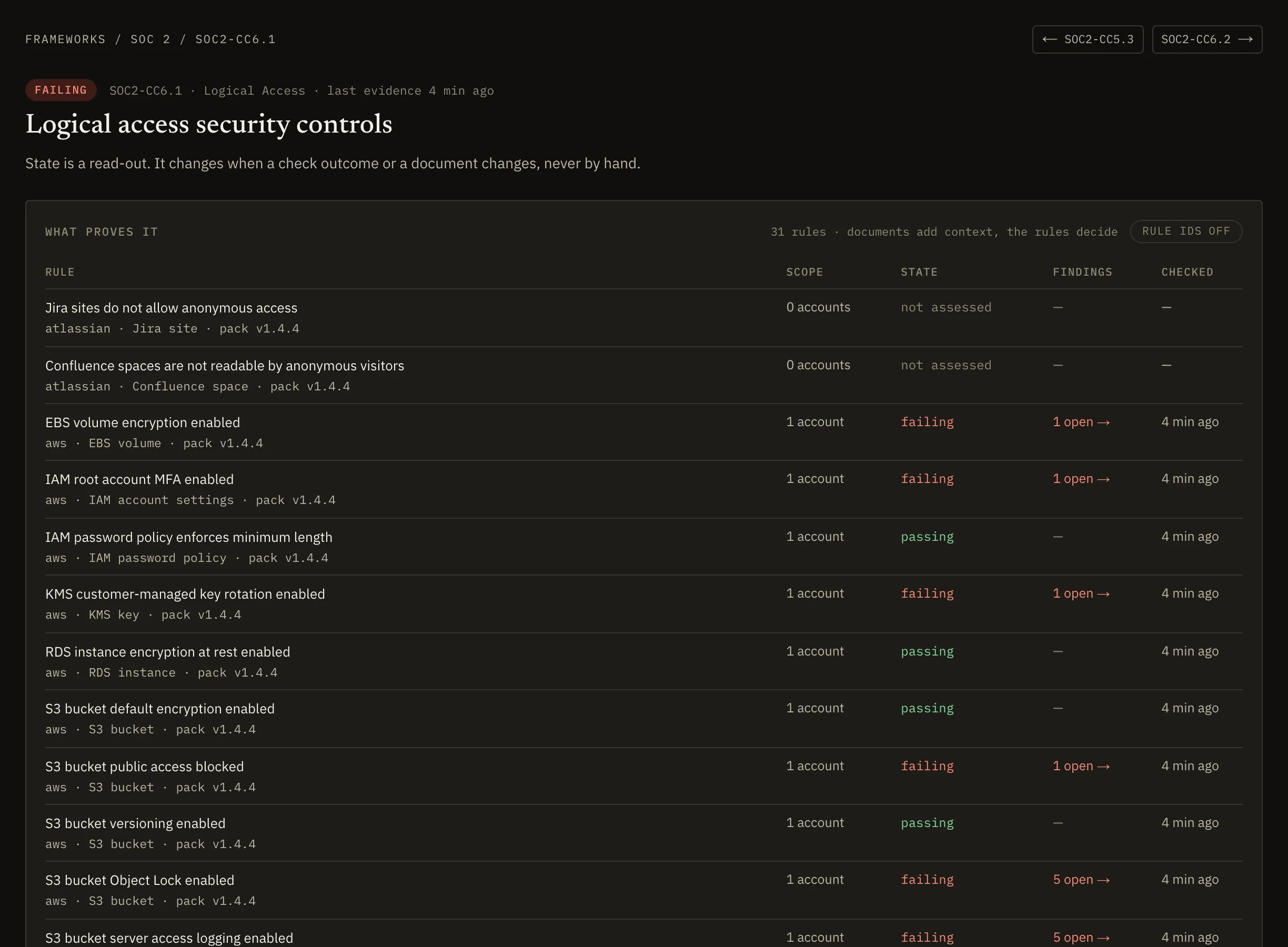
Automated rules, 8: CC6.1 (29 rules), CC6.2 (1 rule), CC6.3 (12 rules), CC6.6 (13 rules), CC6.7 (3 rules), CC7.1 (11 rules), CC7.2 (2 rules), CC8.1 (6 rules).
Documents, 30: CC1.1, CC1.2, CC1.3, CC1.4, CC1.5, CC2.1, CC2.2, CC2.3, CC3.1, CC3.2, CC3.3, CC3.4, CC4.1, CC4.2, CC5.1, CC5.2, CC5.3, CC6.4, CC6.5, CC6.8, CC7.3, CC7.4, CC7.5, CC9.1, CC9.2, A1.1, A1.2, A1.3, C1.1, C1.2.
Automated means at least one rule checks the criterion on every scan. Of the 77 rules, 58 check logical access (CC6), 13 system operations (CC7) and 6 change management (CC8). The other 30 criteria describe how your organisation operates, so policies and records evidence them. One failing check is one finding, counted against SOC 2 and ISO 27001 alike.
Example rules for each criterion
| Criterion | Rules | Example rules |
|---|---|---|
| CC6.1 | 29 |
|
| CC6.2 | 1 |
|
| CC6.3 | 12 |
|
| CC6.6 | 13 |
|
| CC6.7 | 3 |
|
| CC7.1 | 11 |
|
| CC7.2 | 2 |
|
| CC8.1 | 6 |
|
Nothing passes by default
Every control is in one of five states derived from what Meiyam can see, and a control nothing has checked reads as unproven.
A control's state is read from the evidence, never set by hand. A control with automated rules is live when those rules run and pass on every assessed account, and failing when any check fails. Failing takes precedence over every other state, so an open finding cannot hide behind an approved policy. On the dashboard, posture is the share of automatically checkable controls that pass; controls Meiyam cannot check automatically are reported separately. Whether a control is met is your auditor's judgement.
A control no rule checks can rest on a document: a policy in force or an uploaded record. A policy evidences how a control is designed; for a Type 2 period, attach the records that show it operated, such as tickets or review minutes, as the period runs. With nothing attached, a control reads as unproven, which is where every control starts.
Documents age. A policy or record counts as current for 90 days by default, and each workspace can set its own threshold. When the newest document on a control passes it, the control reads as stale until something newer is attached.
Documents age, deadlines hold
- A document reads as stale after 90 days.
- Critical, high and medium findings are due in 7, 30 and 90 days.
- A risk acceptance lasts 90 days by default and 365 at most, then the finding reopens.
Does a rule fail, or is a finding open?
Yes: FailingA rule fails or a finding is open. Failing outranks every other state.
Do its automated rules run and pass on every assessed account?
Yes: LiveIts automated rules run and pass on every assessed account.
Is a current policy or record attached?
Yes: DocumentNo rule checks it; a policy in force or an uploaded record stands in.
Is a policy or record attached, past the freshness threshold?
Yes: StaleIts newest document is older than the freshness threshold.
Nothing attached
UnprovenNothing evidences it yet. Every control starts here.
From finding to fix
Each failed check becomes a finding you can assign, with a recorded history, and only a passing re-scan or a named person resolves it.
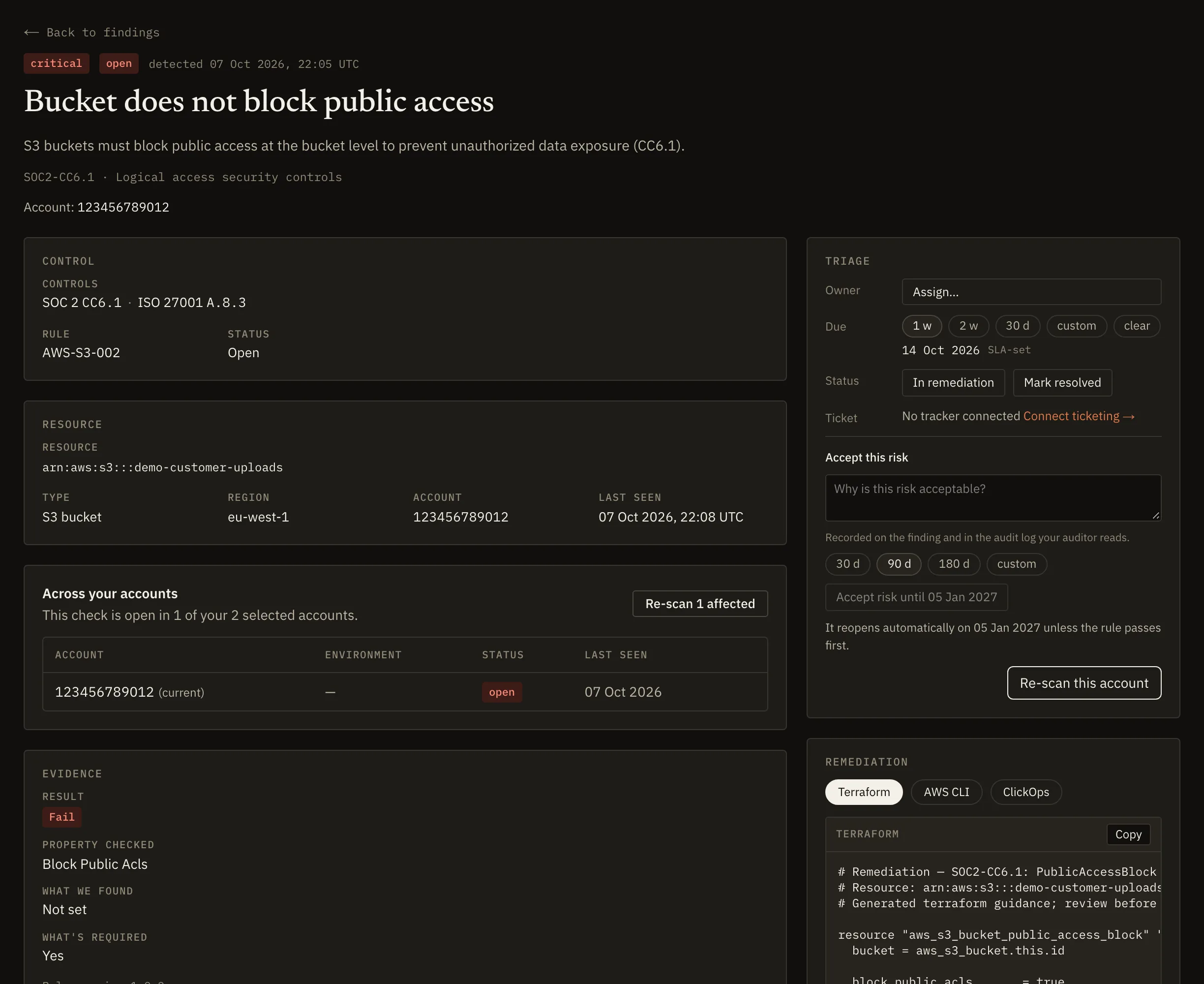
Every failed check becomes a finding on the resource it was read from, ranked by severity, with the captured configuration beside it. New findings get a due date from their severity: by default 7 days for critical, 30 for high and 90 for medium. Each workspace can change these windows, and each finding takes an owner.
When a risk is acceptable, record the decision with a reason and an expiry date, up to 365 days by default. By default only owners and admins can accept a risk. When the acceptance expires, the finding reopens.
Open Jira tickets from findings, one at a time or in bulk, and follow their status on the finding. Closing a ticket never resolves a finding by itself: a re-scan that passes the check resolves it, or a named person marks it resolved, and the timeline records which.
Every assignment, status change, acceptance and ticket event is recorded on the finding's timeline.
Evidence you can verify
Evidence is sealed as it is collected and every export carries a checksum, so your auditor can confirm nothing changed after collection.
When your auditor asks whether a record changed after it was collected, the answer is built in. Meiyam seals each piece of evidence with SHA-256 as a scan collects it, and keeps a tamper-evident record of every scan in your workspace's audit log.
Export evidence for a framework and period as JSON, CSV or PDF. An export holds the score at the end of the period, the findings raised during it, and the policies in force and bills of materials uploaded in it, each with its digest. A SHA-256 checksum covers the exported data, and the export is itself recorded in the audit log.
Tamper-evident means a change can be detected, not that one is impossible.
A digest shows that evidence is unchanged since it was recorded. It does not show that the configuration was correct, which is the job of the rules, and it does not replace your auditor's own testing.
Policies, people and acceptance
Policies, records and acceptance tracking evidence the 30 criteria configuration cannot prove, in the same workspace as the automated checks.
Most of SOC 2 is about how your organisation runs: governance, risk assessment, people, vendors, incident response and continuity. Meiyam includes 23 policy templates, each mapped to the SOC 2 criteria and ISO 27001 requirements it addresses, with an annual review cadence by default. Between them they map to all 38 criteria Meiyam tracks.
Adopt a template or bring your own policy, edit it and keep every version. Approving a version puts it in force, and only the workspace owner can approve. Download any version as a Word document.
Send each person their own link to read and accept the policies that apply to them. Each acceptance names the policy version it was given for, and the record is exportable for your auditor. Keep the people roster current by importing a CSV file or syncing it from Microsoft Entra ID.
Attach dated records, such as board minutes or the write-up of an incident response exercise, to any control no integration can evidence.
Working with your auditor
Give your auditor read-only access limited to the frameworks and dates in scope, or hand over a checksummed export.
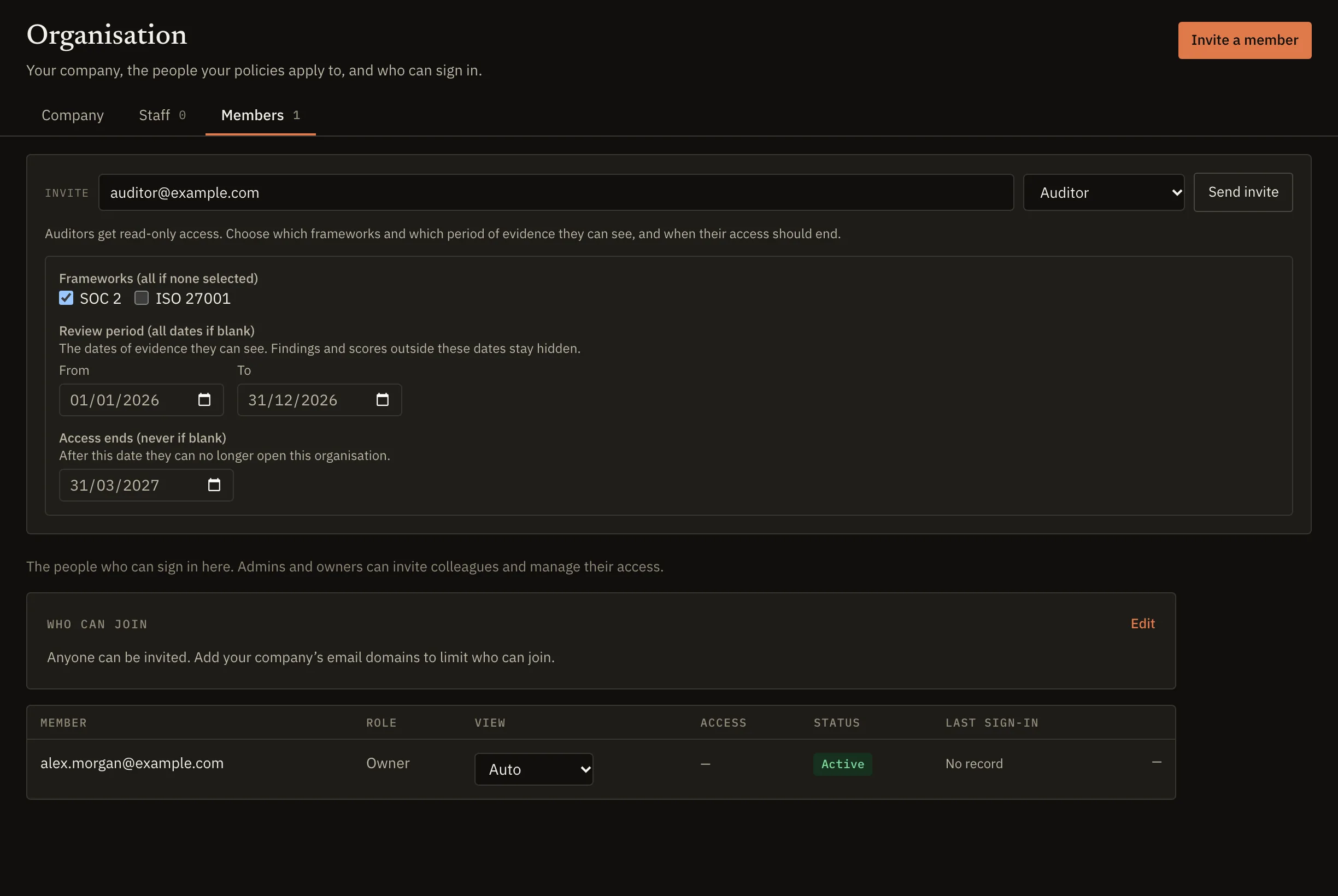
Invite the auditor you choose into the workspace with the Auditor role. It is read-only and limited to the frameworks and the date range you choose, and the server applies the limit to every read rather than hiding parts of the interface.
Document freshness is judged at the end of the granted window, so a policy that was current throughout the audit period does not read as stale because fieldwork happens months later.
Each member holds one of six roles with fixed permissions, which decide who can connect tools, triage findings, approve policies and manage the team: Owner, Admin, Senior remediator, Remediator, Viewer and Auditor. Viewers and auditors cannot change anything.
If your auditor works from files instead, an evidence export for the framework and period carries a SHA-256 checksum over its data.
On the roadmap for audits
These are planned and not available today.
- Audit engagement workflow. Import your auditor's request list, pre-answer it from sealed evidence and export the answered list with a package checkable with standard checksum tools.
- Auditor portal and provenance checks. A scoped space where your auditor reviews evidence, accepts or flags each request and checks each artifact's origin, with every view and download logged.
- Scheduled scans. Scans that run automatically on the cadence you set, so evidence stays current without anyone starting a scan.
- Trust centre. A public security page that publishes only what you choose: selected policies, a live control summary, sub-processors and NDA-gated document requests.
SOC 2 questions
Answers to the questions teams ask most when they prepare for SOC 2 with Meiyam.
Does Meiyam issue SOC 2 reports?
No. A SOC 2 report is issued by an independent CPA firm after it examines your controls. Meiyam does not issue audit opinions, attestations or certifications, and it does not replace the examination. It prepares and organises the evidence the examination relies on.
AM DevOps does not hold a SOC 2 report for Meiyam today.
Type 1 or Type 2: which do I need first?
That depends on what your customer asks for. A Type 1 report covers the design of your controls at one date and is often a first step. A Type 2 report also covers how the controls operated over a period, and it is the report many enterprise buyers expect. Your auditor will help you settle the scope and the period.
The work in Meiyam is the same either way. Each scan's evidence is sealed and kept with the time it was collected, and an evidence export for the period holds the findings raised in it and the policies in force.
Which Trust Services Criteria does Meiyam track?
Security (the 33 Common Criteria), Availability (three) and Confidentiality (two): 38 criteria in all. Processing Integrity and Privacy are not tracked today.
Every SOC 2 report includes Security. You and your auditor decide whether to add the other categories.
What does "automated" mean for a criterion?
At least one rule checks it on every scan. A rule reads one configuration fact, such as whether the AWS root account has MFA or whether a default branch requires a review, and passes or fails it for every resource it applies to.
A criterion with no rule is evidenced by documents and reads as unproven until one is attached. Your auditor can still ask about the process behind a passing configuration.
How often does Meiyam check my systems?
Whenever a scan runs. You start scans for one account or many, the first runs during setup, and a change in your GitHub organization starts a fresh scan of that organization. The change notice itself never becomes evidence: the scan reads the current state. Scheduled scans on a cadence you set are planned and not available today.
What access does Meiyam need for each tool?
Read-only access, listed before you grant it. For AWS that is a cross-account role, created by a CloudFormation template you can read first, that denies every API outside its read allowlist. Each integration page lists the exact permissions.
Can Meiyam change anything in my environment?
Scans cannot: every scanning integration is read-only, and the AWS role denies every API outside its read allowlist. The one exception is optional. The separate Jira ticketing app can create, comment on and transition issues for your findings, and only if you install it.
How is evidence protected from tampering?
Each evidence object is sealed with a SHA-256 digest as it is written. Each scan records a manifest digest in an append-only audit log in which every entry carries the hash of the entry before it, and the application cannot update or delete audit entries.
That makes a change detectable, which is what tamper-evident means. It does not make a change impossible.
What do I give my auditor?
Either read-only access to your workspace, limited to the frameworks and dates in scope, or an evidence export for the framework and period as JSON, CSV or PDF, with a SHA-256 checksum over its data.
What about criteria a scan cannot prove?
They are evidenced by documents. Adopt from 23 policy templates or bring your own, approve each version, track who has accepted it, and attach dated records to controls. A document older than your freshness threshold reads as stale, so the coverage view shows what needs renewing before your auditor finds it.
Where is my data stored?
On AWS in the EU (Ireland) region, where scan results, findings and evidence are stored and processed. Each workspace is isolated from every other workspace at the database level, and evidence objects are stored under a path unique to your workspace. The security page has the detail.
Can I prepare for ISO 27001 at the same time?
Yes. Meiyam supports ISO/IEC 27001:2022 from the same connections and policies. Automated rules check 18 of the 93 Annex A controls on every scan, and approved policies and dated records evidence the clauses and the other controls. Every policy template maps to both frameworks.
What is on the roadmap for audits?
An audit engagement workflow that imports your auditor's request list and answers it from sealed evidence, an auditor portal with provenance checks, scheduled scans and a trust centre. These are planned and not available today, and the roadmap lists each one.
Evidence for SOC 2, from the tools you already run
When Meiyam opens, every account starts on a free trial.