The routine work of a security team, as software.
Meiyam connects read-only to the cloud, code, identity and collaboration tools you already run, checks them against SOC 2 and ISO 27001, shows your team what to fix, and keeps the evidence your auditor will ask for.
Meiyam is software. It does the checking and the record-keeping; you make the decisions; your auditor issues the report.
- Integrations, every one read-only
- 7
- Each lists its access before you connect
- Automated configuration checks
- 77
- Each maps to SOC 2 and ISO 27001
- Frameworks supported
- SOC 2 and ISO 27001
- Scored by the product today
- Hosted on AWS in Ireland
- EU
- The same region for every workspace
Connect
Connect the tools you already run, read-only
Meiyam connects to AWS, GitHub, Microsoft Entra ID, Atlassian, Slack, Okta and Cloudflare, and each integration lists the exact access it needs before you grant it. AWS connects through a CloudFormation template you can read first, with no access keys.
Setup ends with your first scan. After that, scan one account or many whenever you need, and a change in your GitHub organization starts a scan on its own.
Included
- Read-only access, listed before you grant it
- Guided setup that ends with your first scan
- Scans for one account or many, whenever you need them
- A fresh scan when your GitHub organization changes
Transcript
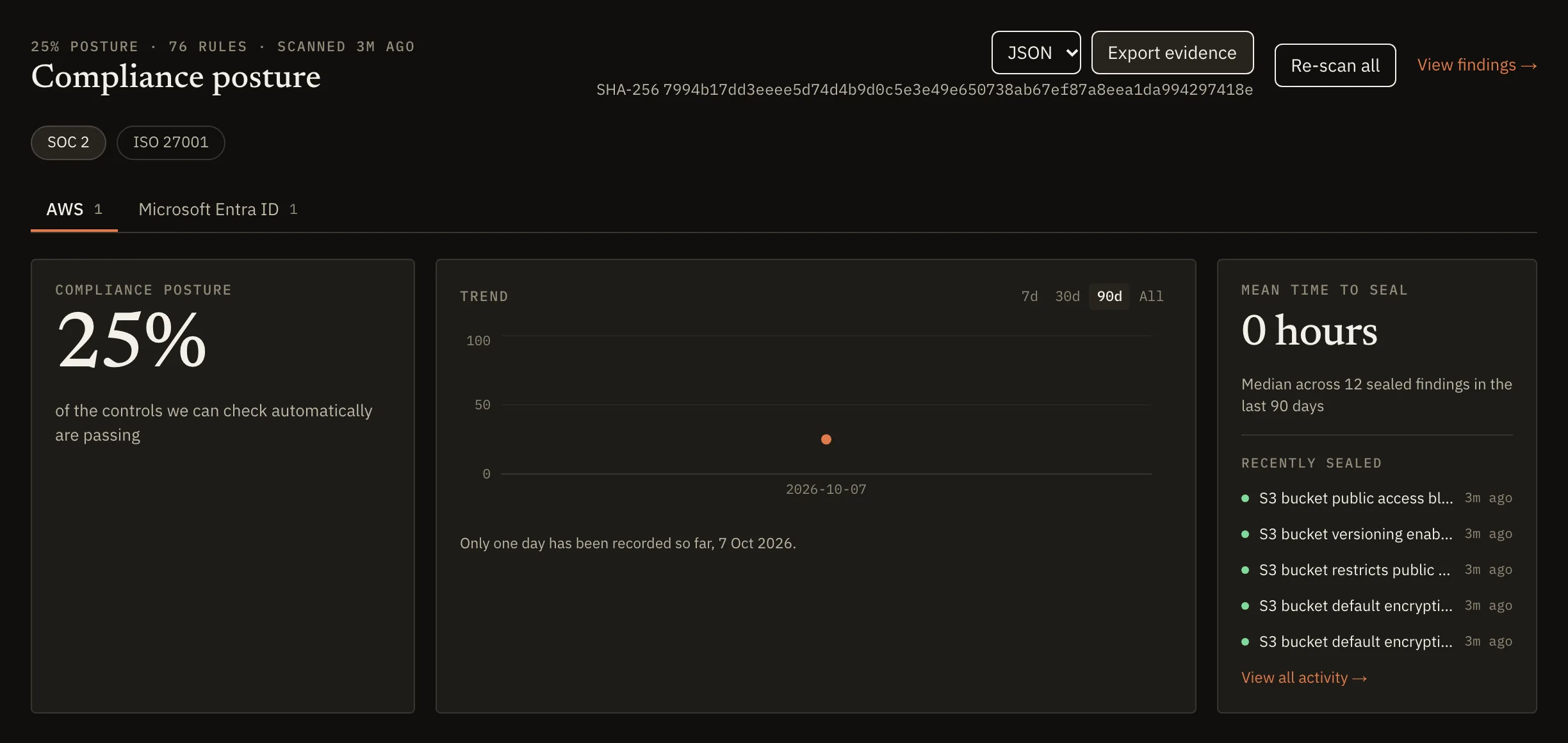
The AWS connection step asks you to launch a read-only CloudFormation stack, then paste the role ARN. A role ARN is pasted and Verify connection is pressed. Meiyam verifies the connection by assuming the role and checking regional access. Connection verified: the account and its reachable regions are listed. Configure your scan: all regions are cleared, eu-west-1 is selected, and SOC 2 is the framework. Run first scan: Meiyam collects configuration across nine services. The dashboard shows the first compliance posture: 25% of the automatically checkable controls passing.
See where you stand
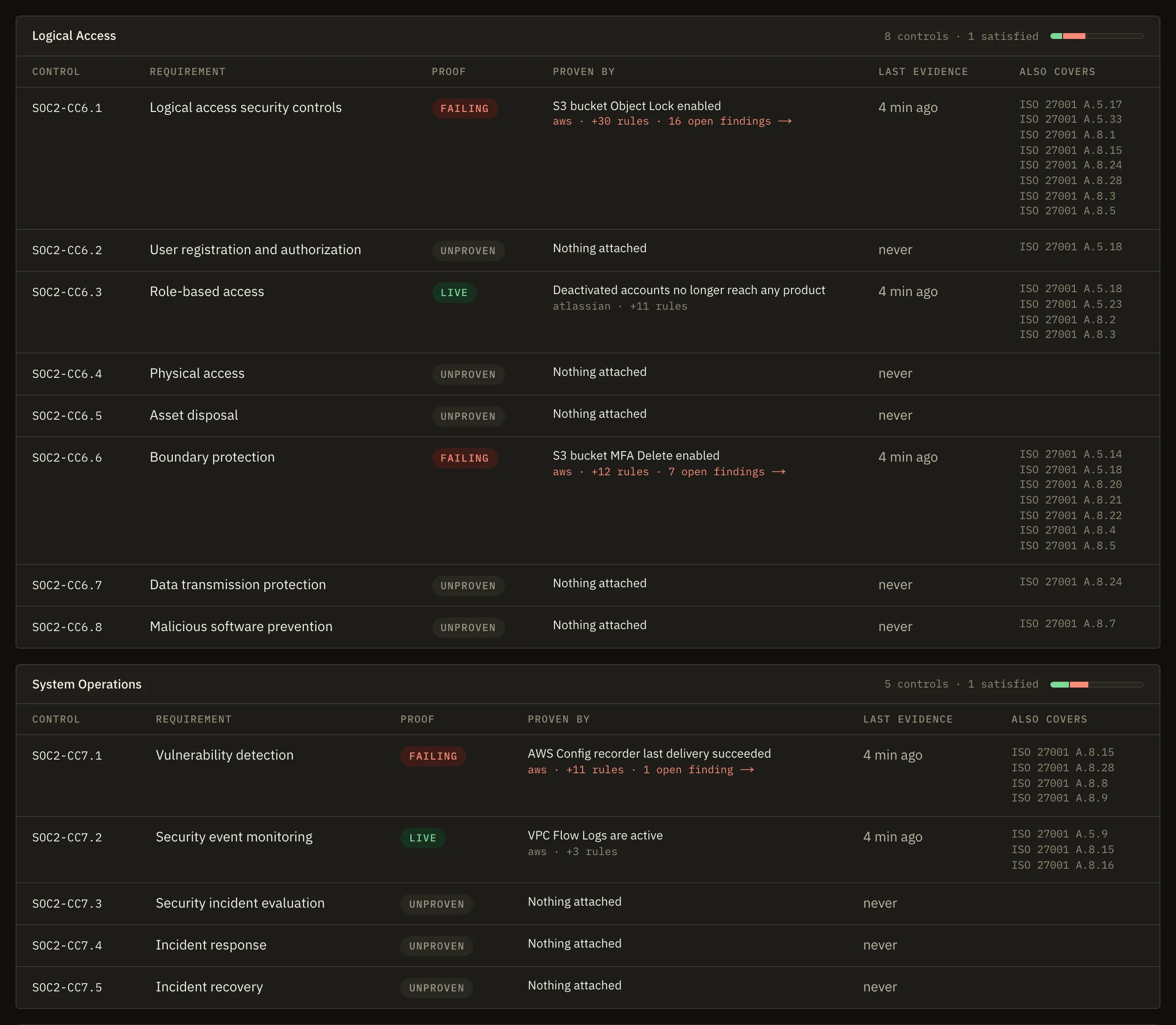
See which controls pass, which fail and which still need evidence
Meiyam supports SOC 2 across Security, Availability and Confidentiality, and ISO/IEC 27001:2022. Automated rules check 8 of the 38 SOC 2 criteria and 18 of the 93 Annex A controls on every scan; approved policies and dated records evidence the rest.
One failing check is one finding, counted against both frameworks. A control nothing has checked reads as unproven, never as a pass.
Included
- SOC 2: Security, Availability and Confidentiality
- ISO/IEC 27001:2022: clauses 4 to 10 and all 93 Annex A controls
- Unproven until something evidences it
- Documents that go stale once older than your freshness threshold, 90 days by default
Documents age, deadlines hold
- A document reads as stale after 90 days.
- Critical, high and medium findings are due in 7, 30 and 90 days.
- A risk acceptance lasts 90 days by default and 365 at most, then the finding reopens.
Fix what fails
Fix what fails, with an owner, a deadline and a record
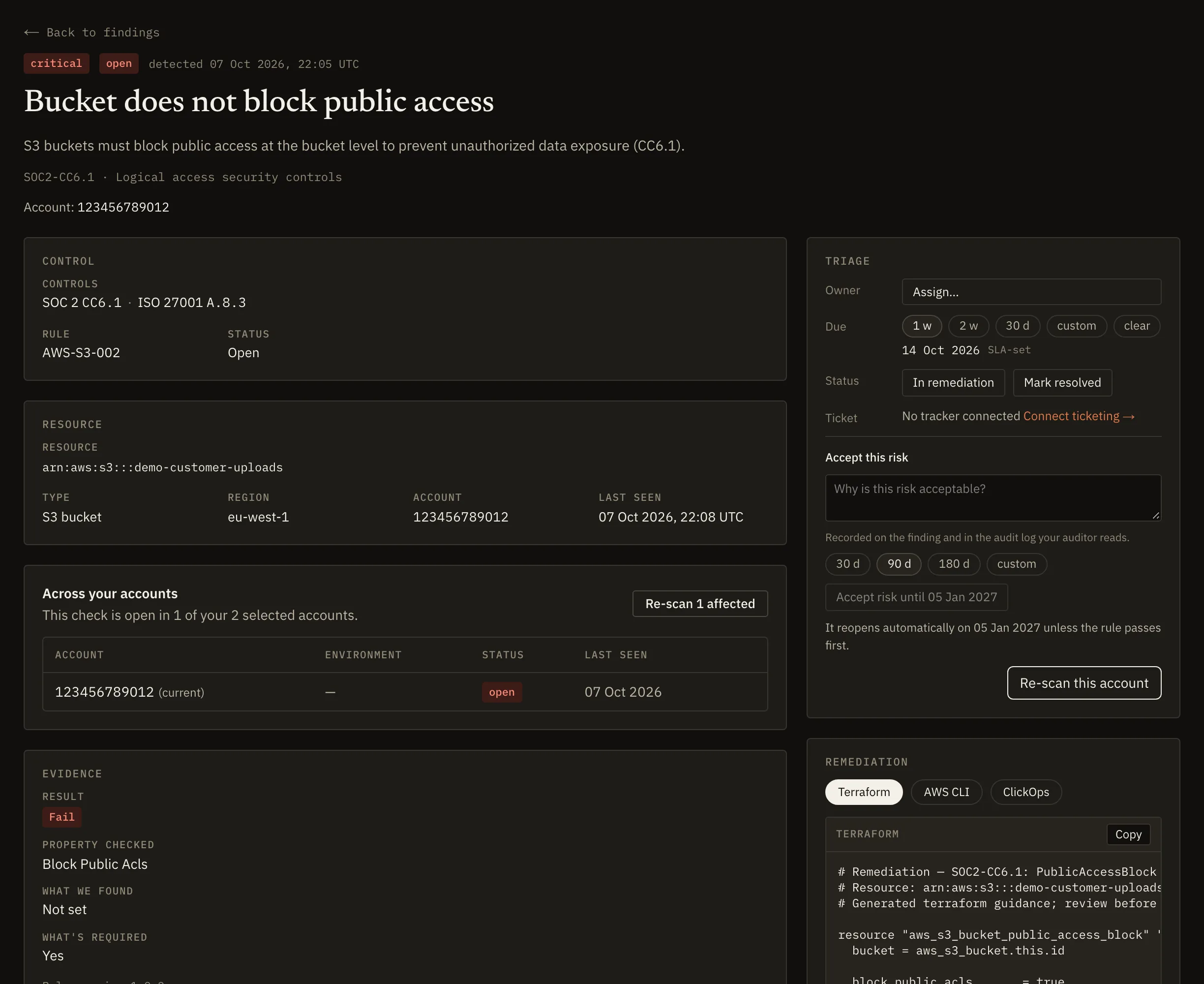
Each failed check becomes a finding on the affected resource, ranked by severity, with the configuration Meiyam found and the SOC 2 criterion and ISO 27001 controls it affects.
Assign an owner, open Jira tickets one at a time or in bulk, or accept a risk with a reason and an expiry, after which the finding reopens. Closing a ticket never resolves a finding by itself: a re-scan that passes the check resolves it, or a named person marks it resolved.
Included
- Owners, and due dates set by severity
- Jira tickets, one at a time or in bulk
- Risk acceptance with a reason and an expiry
- The full history of every finding
- Suggested fixes as console steps, AWS CLI or Terraform, where the rule has one
- Things that need you: one list of what needs a person next
Things that need you
- A connection is failing
- Critical or high findings with no owner for 7 days or more
- A risk acceptance expires within 14 days or has lapsed
- A policy review is overdue
- People who have not accepted their policies
Policies and people
Cover the controls a scan cannot see
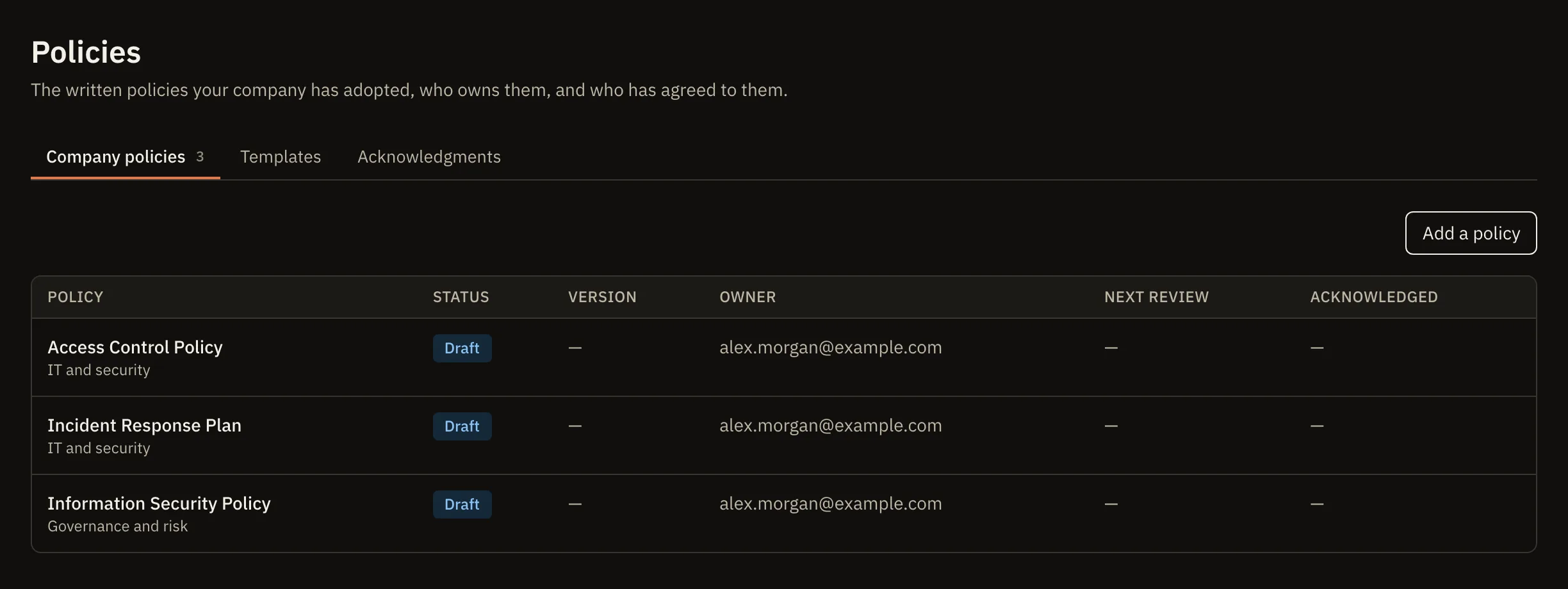
Most of SOC 2 and ISO 27001 is about how your organisation runs security. Start from 23 policy templates mapped to both frameworks, or bring your own; keep every version, approve the one in force and download it as a Word document.
Each person gets a link to read and accept the policies that apply to them, and the roster stays current from a CSV file or Microsoft Entra ID. Attach dated records, such as board minutes, to any control.
Included
- 23 policy templates mapped to SOC 2 and ISO 27001
- Every version kept, with owner approval
- Acceptance tracked per person, exportable for your auditor
- A people roster from a CSV file or Microsoft Entra ID
Hand it to your auditor
Hand your auditor evidence they can check
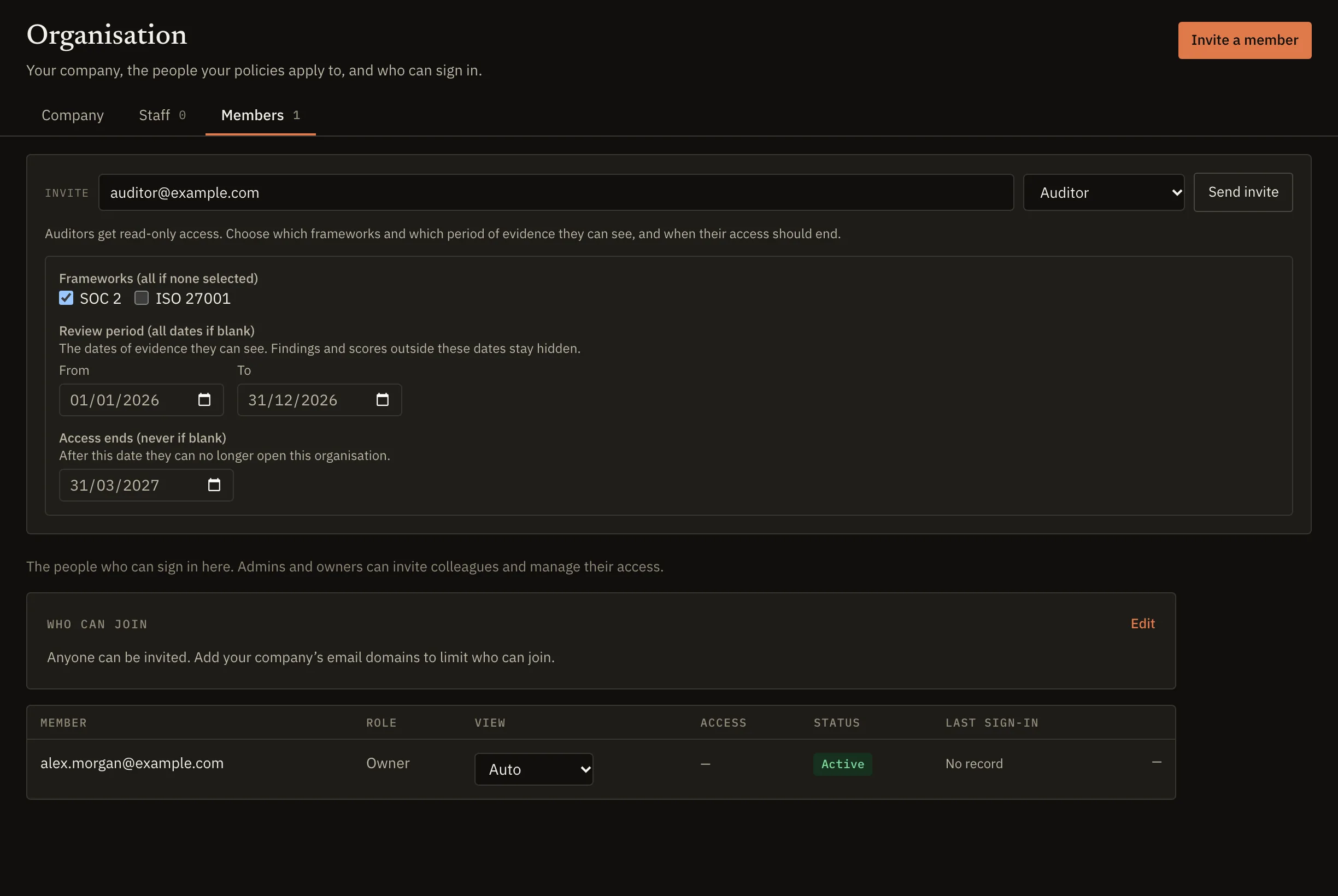
Invite the auditor you choose with a read-only role, limited to the frameworks and dates in scope and ending on the date you set; the server applies the limit to every read. Or export evidence for a framework and period as JSON, CSV or PDF, with a SHA-256 checksum.
Evidence is sealed as each scan collects it, so a later change is detectable. An export for a Type 2 period holds the findings raised in it and the policies in force.
Included
- Read-only auditor access, scoped to frameworks and dates
- Evidence exports with a SHA-256 checksum
- Evidence sealed as it is collected
- Every export recorded in the audit log
What Meiyam does, and what stays with you and your auditor
Meiyam collects and organises the evidence. You operate the controls and choose your auditor, who tests them and issues the report or certificate.
You
The organisation being audited
- Decide the scope
- Operate the controls
- Write and approve policies
- Choose an auditor
Meiyam
The checking, chasing and record-keeping
- Connect read-only
- Check configuration
- Seal evidence
- Track documents and acceptance
- Export for your auditor
Auditor
An independent auditor or certification body
- Test the controls
- Issue the report or certificate
Also in every workspace
Security and data handling- Home screens
- Views for engineering, security and leadership.
- Things that need you
- One list of what needs a person next, from a failing connection to an overdue policy review.
- Roles
- Six roles with fixed permissions, including a read-only auditor.
- Sign-in
- Multi-factor sign-in and optional allowed email domains.
- Change digest
- What changed this week, fortnight or month.
- Webhooks
- Signed events to your HTTPS endpoints, with retries and a delivery log.
- Workspace export
- The owner can export the whole workspace at any time.
- SBOM and CBOM
- Software and cryptography bills of materials, with licence and vulnerability views.
- Inventory and trend
- Every resource each scan saw, and your score over time.
Questions about Meiyam
Does Meiyam support SOC 2 and ISO 27001?
Yes. Meiyam supports SOC 2 across Security, Availability and Confidentiality, and ISO/IEC 27001:2022. Automated rules check 8 of the 38 SOC 2 criteria and 18 of the 93 Annex A controls on every scan; approved policies and dated records evidence the rest.
How often does Meiyam check my systems?
Whenever a scan runs. You start scans for one account or many, the first runs during setup, and a change in your GitHub organization starts one automatically. Scheduled scans on a cadence you set are planned and not available today. Each scan's evidence is kept with the time it was collected, so an export for an audit period holds the findings raised in it and the policies in force.
Can Meiyam change anything in my environment?
Scans cannot: every scanning integration is read-only, and the AWS role denies every API outside its read allowlist. The optional Jira ticketing app, installed separately, can create, comment on and transition issues for your findings.
How does Meiyam protect evidence from tampering?
Each evidence object is sealed with a SHA-256 digest as it is written, and each scan is recorded in an append-only, hash-chained audit log the application cannot alter. A later change is detectable, which is what tamper-evident means; it is not made impossible. The security page shows each step.
Does Meiyam issue SOC 2 reports or ISO 27001 certificates?
No. Independent CPA firms issue SOC 2 reports, and accredited certification bodies certify ISO 27001. Meiyam prepares the evidence they examine. AM DevOps does not hold a SOC 2 report or an ISO 27001 certification for Meiyam today.
Where does Meiyam store my data?
On AWS in the EU (Ireland) region. Each workspace is isolated from every other at the database level, and evidence is stored under a path unique to your workspace. The security page has the detail.
Is Meiyam a GRC platform?
Meiyam covers the compliance and policy side of a governance, risk and compliance (GRC) programme for SOC 2 and ISO 27001. Findings can be risk-accepted with a reason and an expiry today; a risk register and a vendor register are planned.
See where you stand against SOC 2 and ISO 27001
When Meiyam opens, every account starts on a free trial.
Meiyam is software. It does the checking and the record-keeping; you make the decisions; your auditor issues the report. Meiyam issues no audit opinion, attestation or certification.